

Governance
Leaders need evidence, not anecdotes
MPA Tools helps teams produce clearer operational evidence for endpoint health, action history, and recurring support patterns.
For IT Managers
MPA Tools helps reduce wasted troubleshooting time, improve first-touch resolution, and give administrators one practical workspace for Intune, ConfigMgr, remote action, and endpoint evidence.
The cost is rarely just one tool or one incident. It is repeated portal switching, unclear escalations, slow root cause analysis, and administrators spending senior time on evidence gathering.
Governance
MPA Tools helps teams produce clearer operational evidence for endpoint health, action history, and recurring support patterns.

Adoption
No agent deployment and no required backend means teams can trial the product quickly and expand usage after validating real workflows.

Service
Endpoint issues compound quickly when support teams cannot identify the device state, management source, or likely next action.
MPA Tools is a product for administrators, but the management value is operational: fewer blind spots, cleaner escalations, faster fixes, and a more repeatable support model.
Administrators can see endpoint state, management source, and troubleshooting context without rebuilding the picture from scratch.
Common support paths can become sequences and workflows, reducing variation between administrators and shifts.
Support Intune, ConfigMgr, co-managed, server, workstation, kiosk, and specialized Windows scenarios from one product workflow.
Per-administrator pricing with no managed-device limit keeps the buying model easy to explain and budget.
No credit card, no endpoint agents, and no required backend help teams prove fit before committing budget.
AI-assisted insight helps administrators summarize device context and move toward the next action with less guesswork.
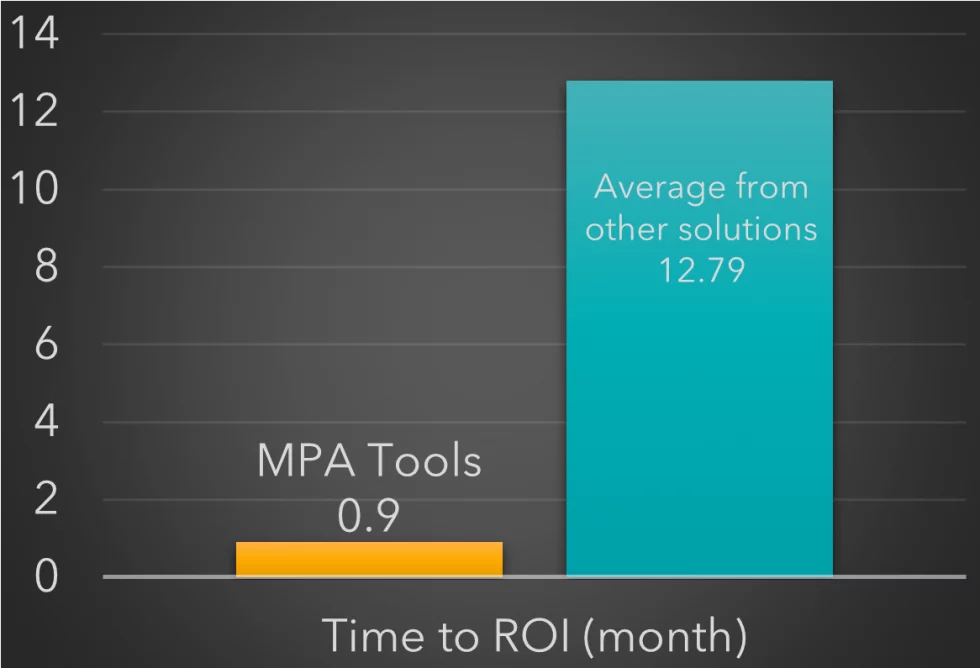
The management value starts when experienced administrators spend less time assembling evidence across portals and more time resolving issues.

MPA Tools gives administrators a practical operating surface for Intune, ConfigMgr, and hybrid Windows environments without a long deployment project.
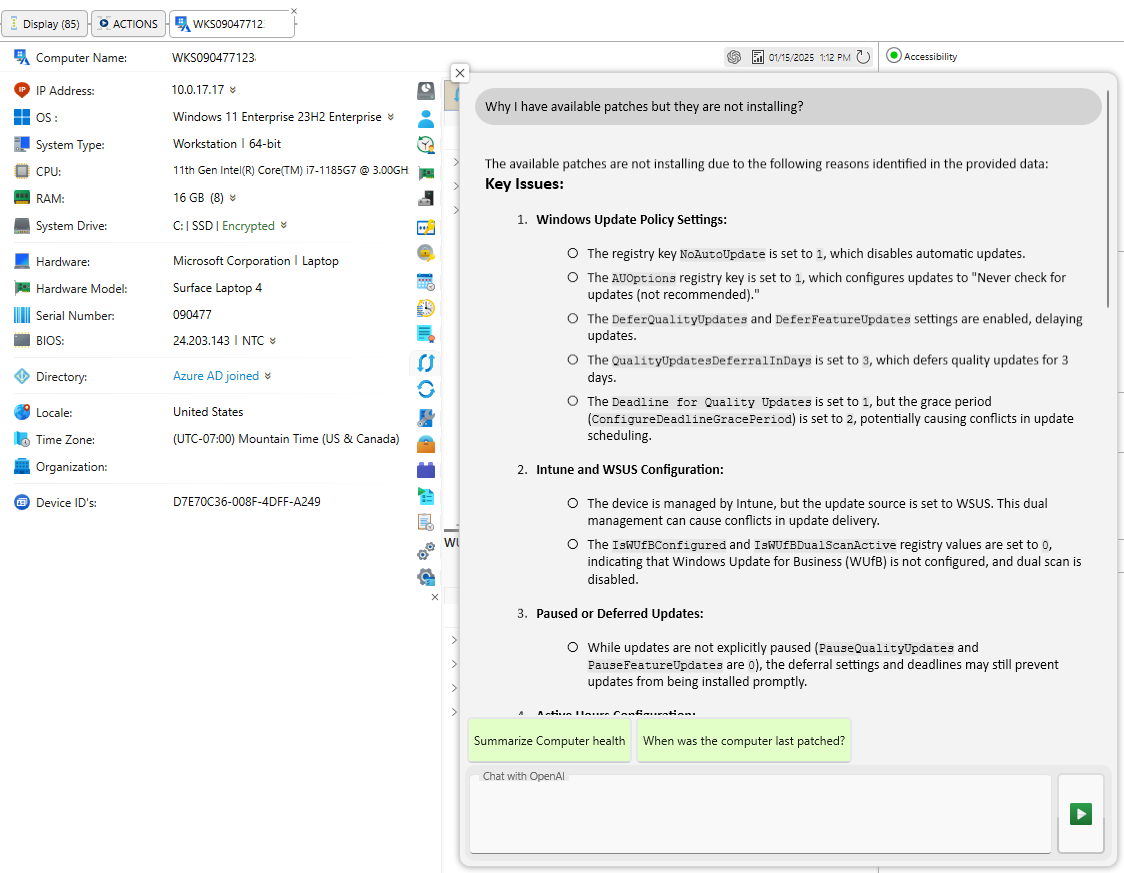
Faster log and state collection improves service desk escalation quality and helps endpoint engineers reach the next action sooner.
FAQ
MPA Tools helps endpoint teams reduce time spent gathering evidence, switching portals, and escalating unclear issues. Managers get faster resolution, better administrator productivity, and predictable per-admin licensing.
The product is designed for fast installation with no endpoint agents and no required backend. Teams can begin validating remote actions, Intune visibility, ConfigMgr client context, and troubleshooting workflows during the 30-day trial.
MPA Tools is meant to reduce operational risk by giving administrators clearer evidence before action. The right rollout still depends on proper permissions, admin procedures, and change control for your environment.
Start the trial, point MPA Tools at real endpoint issues, and measure how much faster your administrators can move from unclear status to practical resolution.