

Scripts
Unknown status slows RCA
IME results can hide useful stdout, stderr, return code, and script identity details unless administrators dig through local logs.
For Intune Admins
MPA Tools helps Intune administrators move from vague portal status to endpoint-level evidence for scripts, remediations, apps, device state, and Entra joined remote support.
Intune admins often know a script, remediation, or app deployment is unhealthy before they know the actual root cause. MPA Tools shortens the path from portal status to device evidence.
Scripts
IME results can hide useful stdout, stderr, return code, and script identity details unless administrators dig through local logs.

Remediation
Detection and remediation results are more useful when administrators can compare device evidence with the policy and action history.

Devices
Modern cloud-managed devices still need remote checks, state validation, and support workflows that do not collapse under pressure.

Drift
When configuration, compliance, apps, or scripts drift, admins need evidence fast enough to fix the device before escalation grows.
MPA Tools gives Intune administrators a clearer way to move from portal status into endpoint evidence, update context, and fleet-level visibility.
Review Intune update ring and device signals so administrators can separate policy configuration from endpoint behavior.
Use device context to narrow script, remediation, and app troubleshooting before escalating or interrupting the user.
Use MPA Tools beside Intune to make Entra joined and Intune-managed endpoint support more concrete.
Intune charts
Use MPA Tools beside Intune to make troubleshooting more concrete, especially when the admin center gives status but not enough explanation.
Find the evidence behind failed scripts faster, including the clues administrators usually chase through IME logs.
Validate detection and remediation behavior with device context instead of treating each failure as a new mystery.
Bring application, policy, and device state into the troubleshooting flow so admins can spot mismatches faster.
Use tenant-connected context where configured to support Entra joined and Intune-managed devices more effectively.
Capture device-level details before disrupting users or escalating to another team.
Summarize relevant endpoint details and guide the next troubleshooting move when the signal is spread across many places.
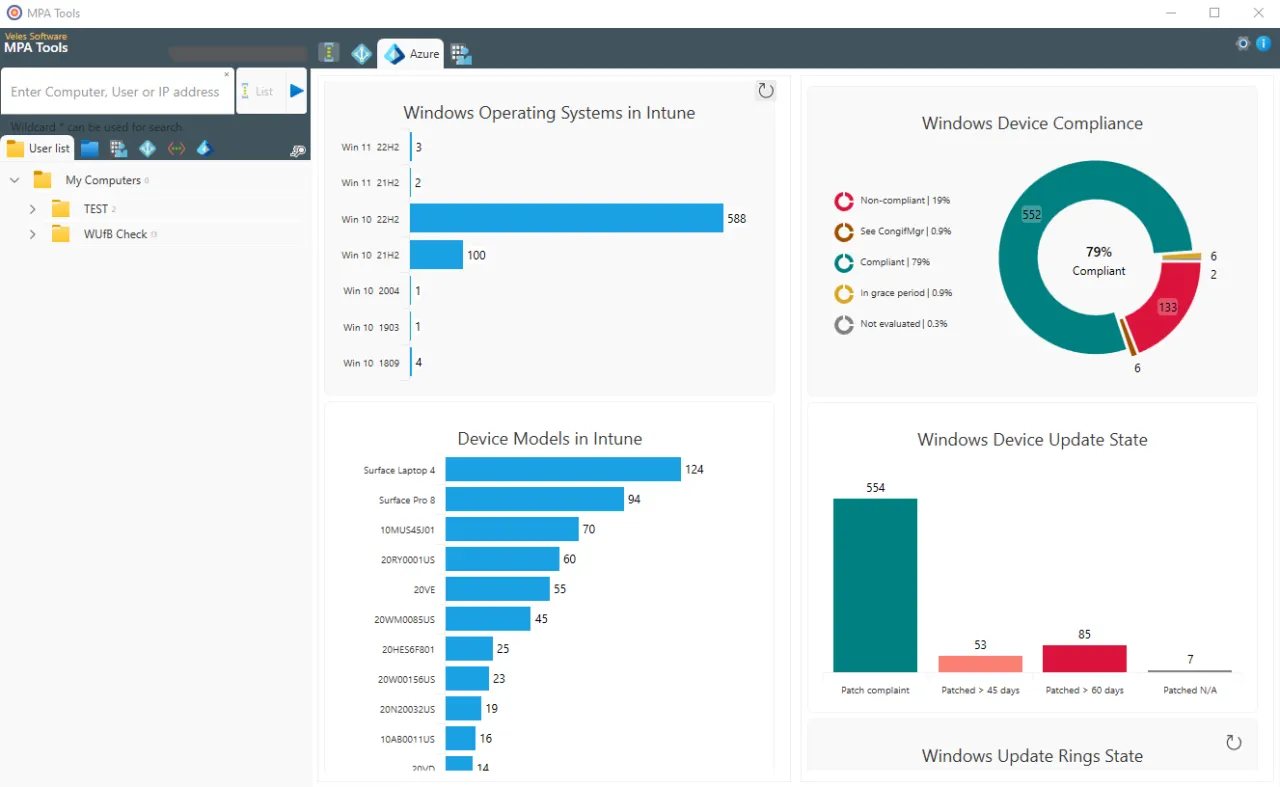
Use MPA Tools to see enough Intune context to understand where managed devices, policies, and operational signals need attention.
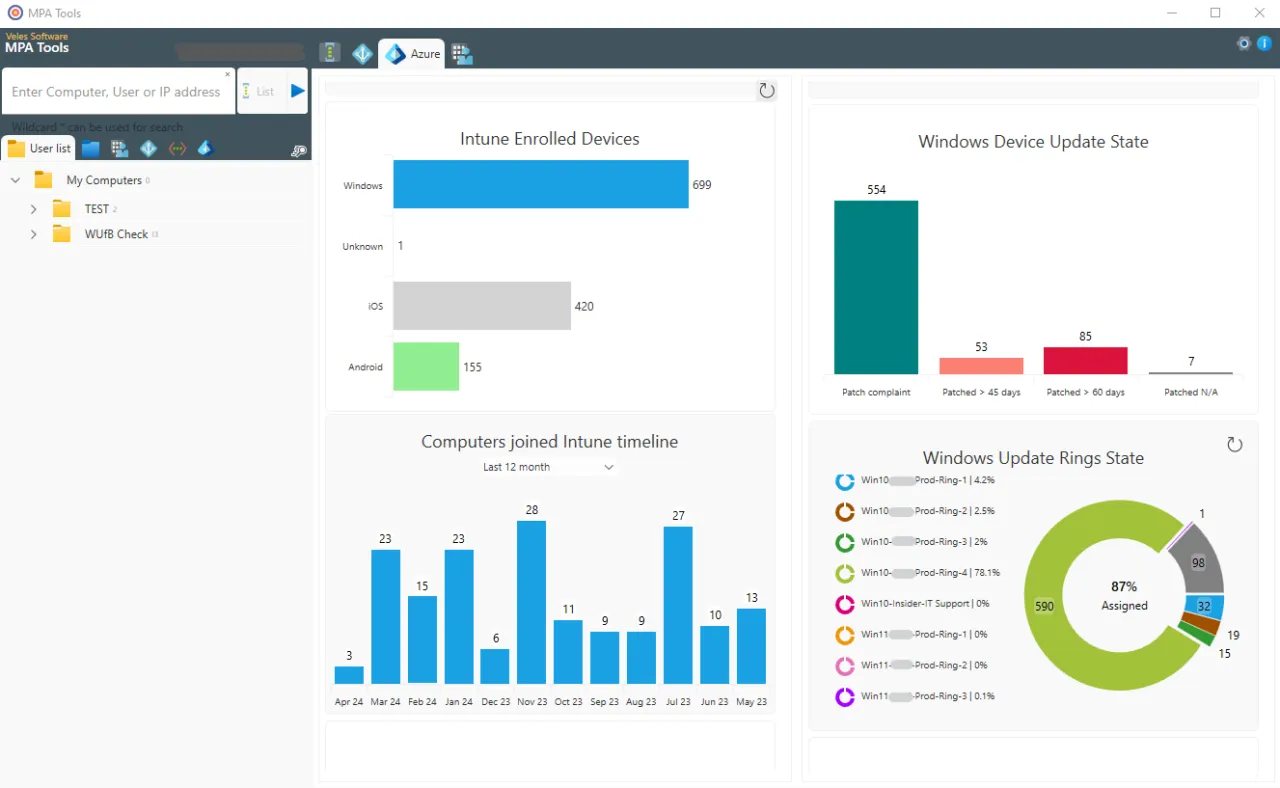
Connect update ring posture to the endpoint troubleshooting conversation before deciding whether the issue is policy, device state, or timing.
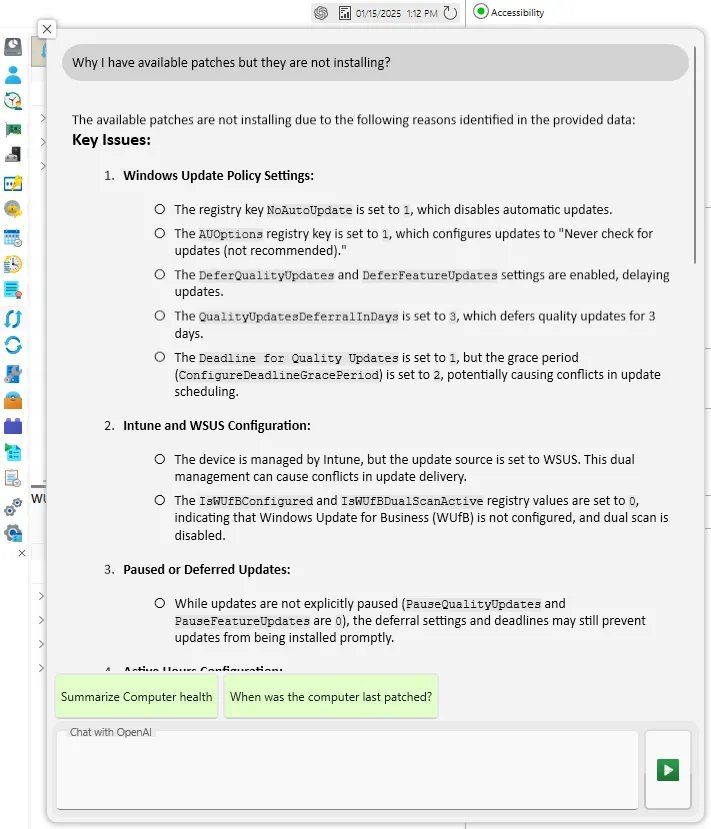
Use AI-assisted summaries to interpret Intune and endpoint evidence when the next troubleshooting step is not obvious.
FAQ
MPA Tools surfaces script status, return codes, error details, and device context so administrators can start with evidence instead of manually searching IME logs on each endpoint.
No. MPA Tools complements Intune by giving administrators a practical troubleshooting and remote action workspace for day-two operations, especially when portal-level status does not explain root cause quickly enough.
Yes. MPA Tools is designed for modern Windows estates including Entra joined and Intune-managed devices where administrators need remote insight, policy context, and faster troubleshooting.
Use the MPA Tools trial against scripts, remediations, Entra joined devices, and endpoint issues your admins already spend time chasing.