

Reports
Report Builder is too slow for routine answers
Hardware inventory and operational checks should not require SQL or a custom report every time an admin needs a practical answer.
For ConfigMgr Admins
MPA Tools helps SCCM administrators validate client health, inventory, collections, deployment state, cache, and endpoint properties without turning every answer into a report-building project.
SCCM/MECM environments are rich with client and inventory data, but administrators need a quicker path to turn that data into support action, validation, and reporting.
Reports
Hardware inventory and operational checks should not require SQL or a custom report every time an admin needs a practical answer.

Health
Broken clients, stale inventory, cache problems, and deployment issues are easier to handle when admins can validate state quickly.

Collections
Admins need to move from a collection or computer list into actions, properties, exports, and follow-up work without losing context.

Co-management
ConfigMgr data, Intune data, Active Directory, and Entra ID all matter when a co-managed endpoint needs support.
MPA Tools helps SCCM administrators keep client health, inventory, disk posture, and hybrid endpoint context close to the actual support workflow.
Use ConfigMgr-backed visibility to understand client health, inventory posture, and device groups before choosing an action.
Turn common inventory and status questions into operational answers without beginning in SQL or report design.
Use SCCM evidence beside Intune and Active Directory signals when co-managed endpoints need practical support.
SCCM charts
MPA Tools adds a practical admin layer around the SCCM/MECM tasks that take too many clicks or too much custom reporting.
Create useful inventory reports from selected computer properties without writing SQL or building a custom SSRS report.
Validate SCCM client state, inventory age, connectivity assumptions, and common client issues during support work.
Review deployment and endpoint state with enough context to determine whether the issue is client, content, policy, or device related.
Sequence common support tasks so administrators can run known fixes against one device or many devices.
Collect hardware and software details from live endpoints, or use ConfigMgr data when direct access is not available.
Support environments where ConfigMgr and Intune both matter to the final answer.
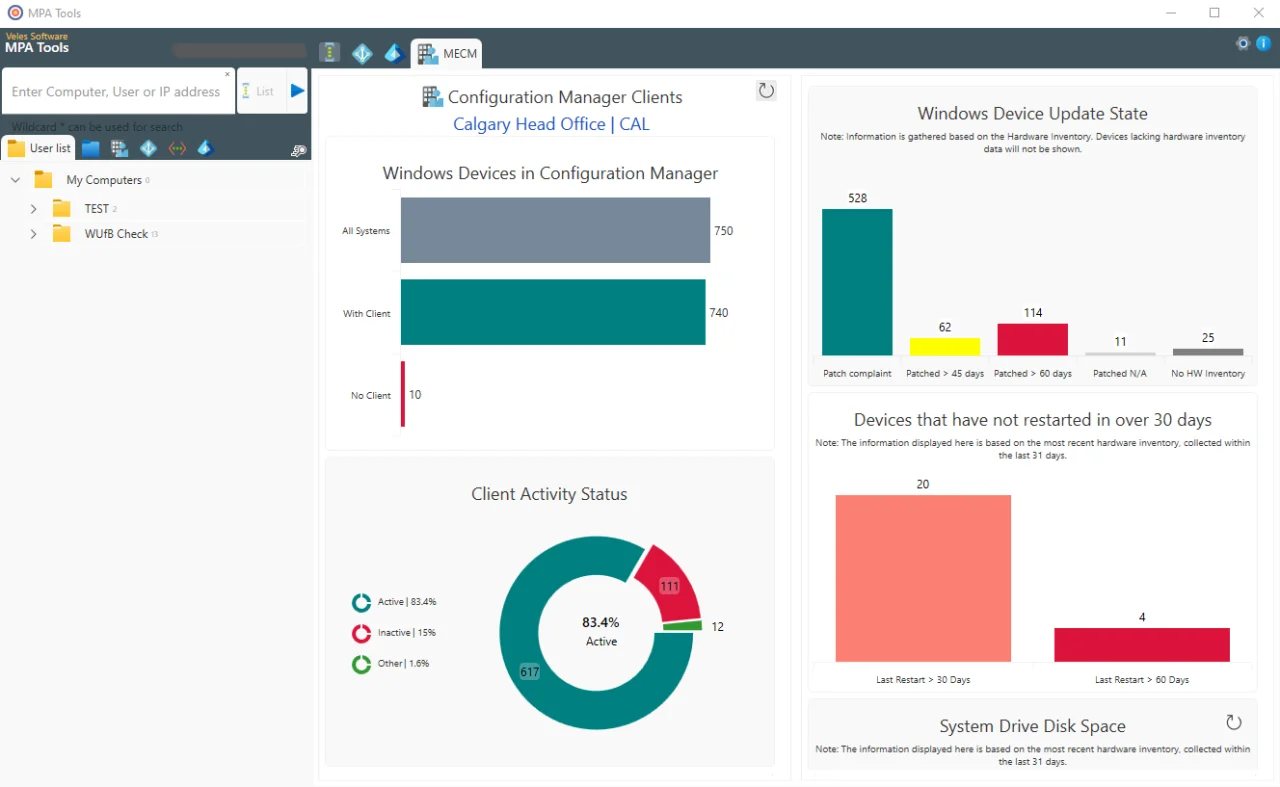
Create practical inventory and status answers from the administrator workflow instead of starting in custom report design.
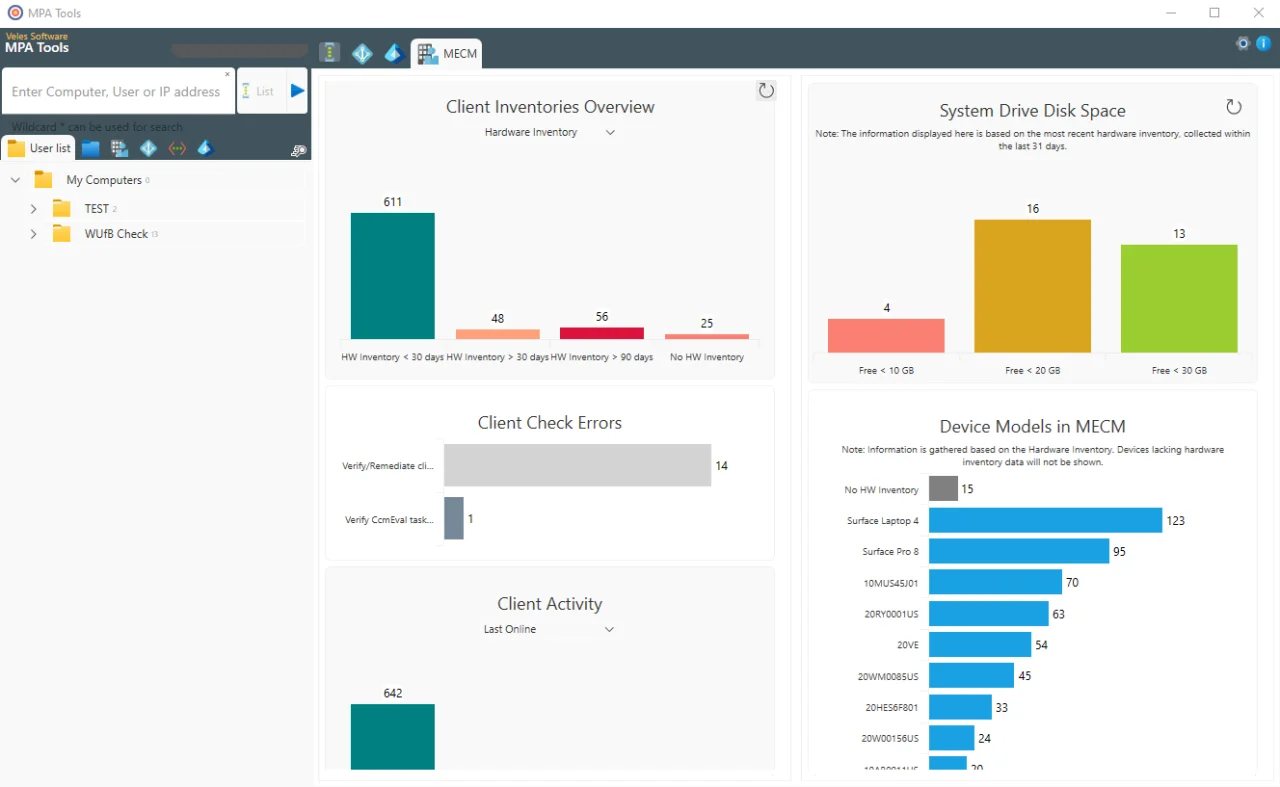
Use SCCM-backed views to identify endpoints that need follow-up because disk, inventory, or client signals are drifting.
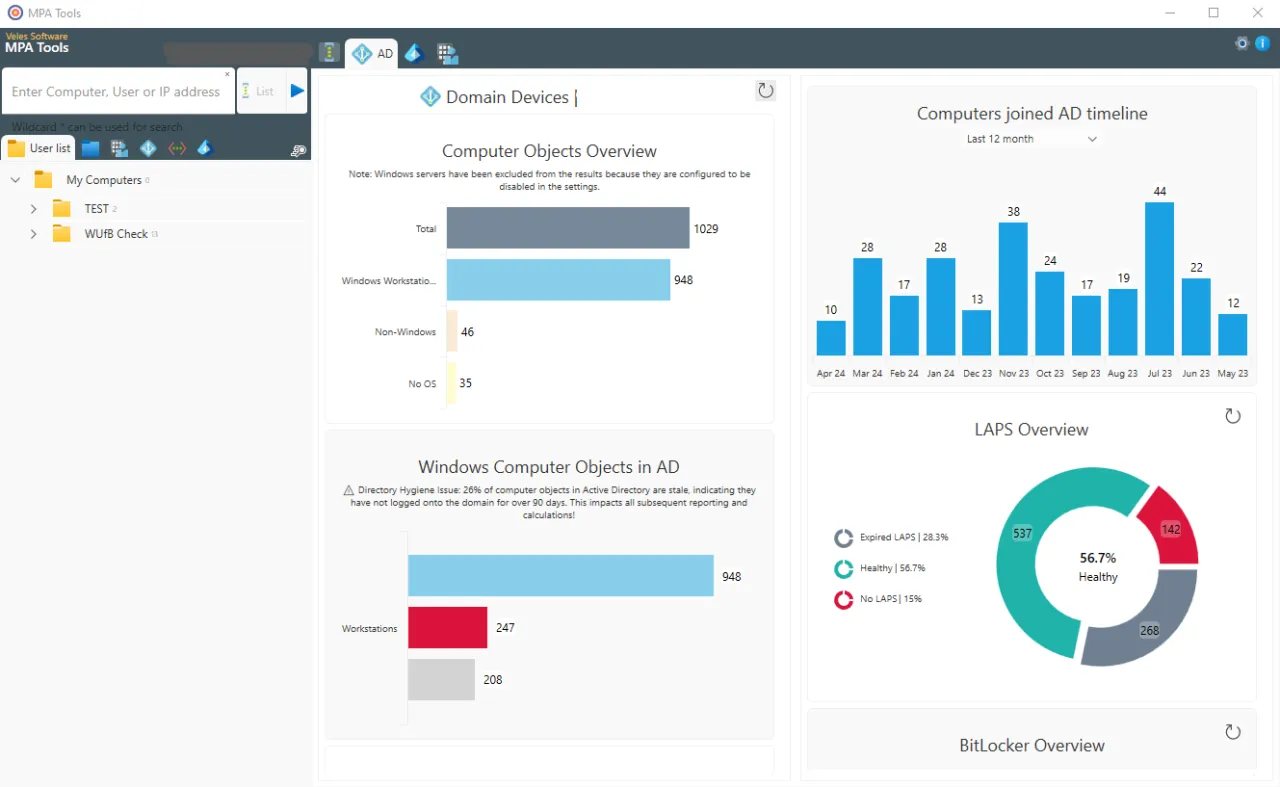
Use ConfigMgr data beside Active Directory, Intune, and Entra signals when co-managed endpoints need investigation.
MPA Tools is designed to reduce the distance between selecting a device set and producing a support-ready answer.
Start from a custom list, OU, SCCM collection, or security group depending on how the task is scoped.
Review client state, hardware inventory, cache, deployment details, or remote properties needed for the question.
Run immediately for quick validation or add actions to a sequence for repeatable remediation.
Use the output to resolve the ticket, report to stakeholders, or identify endpoints needing follow-up.
FAQ
Yes. Administrators can build useful hardware inventory and device reports by selecting properties and actions in MPA Tools instead of writing SQL queries or building custom Report Builder reports.
Yes. MPA Tools can work with ConfigMgr and SCCM-oriented workflows, including collections, client data, hardware inventory, client health, deployment troubleshooting, and co-management context.
MPA Tools can use ConfigMgr-side data where available, which helps administrators keep working when direct endpoint connectivity is unavailable or when a fast inventory-backed answer is enough.
Use the MPA Tools trial to validate client health checks, inventory reporting, cache maintenance, and co-management troubleshooting in your own environment.